We’re happy to announce the release of v2.9.0, which includes a few new features as well as bug fixes. Check out the summarized changelog below:
- Updated npm dependencies, addressing various security warnings
- Ported license completion to the generic language server (neovim)
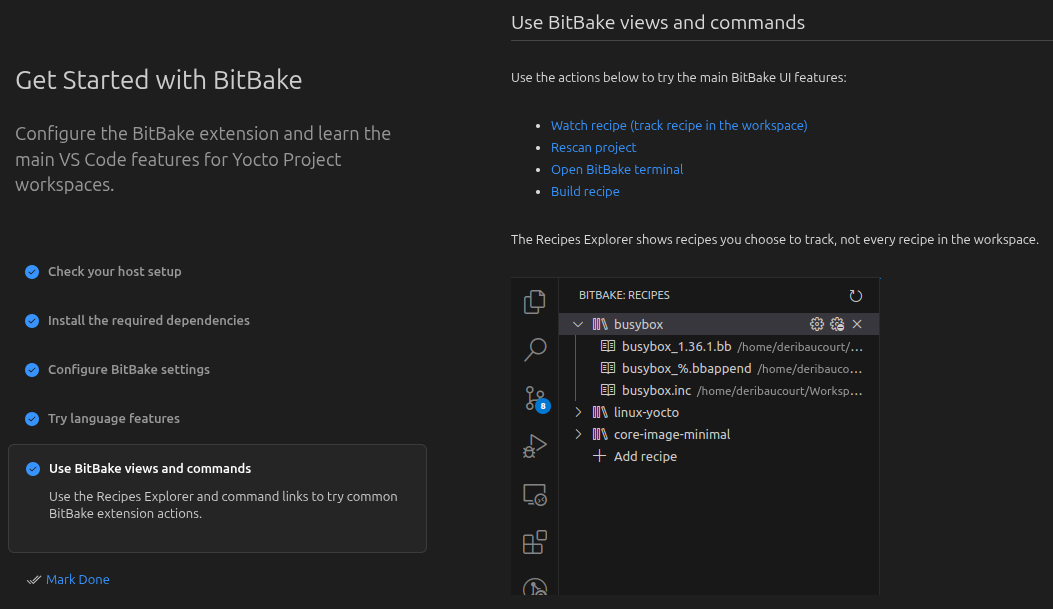
- Added a Walkthrough for getting started with the extension
- Minor bugfixes
- Adopted a self-hosted runner for CI to improve build times and reliability
Please check out the full release notes to see all the changes made in this release.
Configuration errors tweaks
Maybe you remember encountering the pop-up message “Couldn’t start and configure BitBake”? Even though it could be disabled, it would show once every time a new workspace was opened that could contain BitBake files. Since activation events in VS Code are quite limited, it also appeared in unrelated workspace folders, which could be annoying. (This was the number one UX issue, at least in my user perspective).
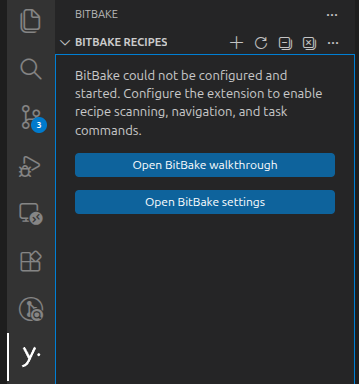
This release revamps the error handling to instead be displayed in the status bar, which is more expected from VS Code extensions. It will be less intrusive, yet quickly accessible.

Clicking the status bar in this state will automatically bring up the Yocto Recipe left-pannel. Indeed, this pannel is now also able to display an error status. Yet again, we designed this to align with VS Code extension best practices, and align with user expectations. When not configured, the extension will entice the user to open their BitBake settings in order to benefit from the extended IDE features. As a reminder, the extension is very much usable as a language server and highlighter without any configuration. But if users pass a few settings to allow VS Code to run BitBake command, then many features unlock in order to perform most tasks through the UI (build, scan recipes, manage devtool workspaces, …).
As you can see in the screenshot bellow, a new feature makes its appearance here: the Walkthrough. Read the next section to find out more!
Walkthrough for new users
From the Yocto Project’s perspective, the VS Code extension is made to appeal to new Yocto users. VS Code is indeed very popular with the new generations of developers. As such, we added a Walkthrough to ease new users into leveraging the extension’s features. It is complimentary with our README, which also appears as our marketplace’s frontpage.
Walkthroughs are common VS Code extension “tutorials” which showcase how to configure and use an extension. It is not intended to be a training on Yocto itself, but simply to document the extension for new users. Our walkthrough currently consists of a few simple pages. The first ones point to the Yocto Project’s documentation and quick start guide to make sure the user has set-up their computer for Yocto development. Then we point to the settings and expose a few animations to showcase the extension’s features.
Many thanks to @gcomneno, a new contributor, for implementing this feature and also helping with other workflows.
What’s next?
With the recent release of the Wrynose Yocto LTS, we are very excited to align our reference support for our next version. A first pass will consist in bumping all our dependencies and test project to align with the latest Yocto version. We would then like to add new features related to Wrynose, including some integration for bitbake-setup, which could be integrated into the Walkthrough as well.
This release would not have been as comprehensive without the help of our public contributors, whom we sincerely thank. If you as well want to participate in the development, you are more than welcome to reach out to us on GitHub, or the Yocto Project’s IRC channel. If you have bug reports, or feedback on the extension and its new Walkthrough, we would also be very pleased to hear from you.