Vulnerability assessment: VulnScout or Dependency-Track?
Complex software systems may include hundreds or even thousands of vulnerabilities. In such contexts, it is crucial to be aware, monitor, and assess vulnerabilities detected in products. In Europe, the Cyber Resilience Act (https://digital-strategy.ec.europa.eu/en/policies/cyber-resilience-act) makes it mandatory for products with digital elements. Similar requirements also exist in other regions and sectors through different regulations and standards. In this article, we compare two tools: VulnScout from Savoir-faire Linux and Dependency-Track from OWASP.
The key distinction is not simply that VulnScout is lighter to run. VulnScout is best understood as a build-native, artifact-centric vulnerability assessment workbench, especially for embedded Linux workflows and Yocto-based products. Dependency-Track is better understood as a centralized, continuously operating software supply chain inventory and governance platform. Those are different operational models, and they solve different problems.
Before publication, one version note matters. Dependency-Track 5.0 became generally available on June 9, 2026, only a few days before this draft was written. All screenshots below are from Dependency-Track 4.14, the version we ran during hands-on testing. The written comparison, however, has been checked against the Dependency-Track 5 version. This post explicitly calls out when a new feature is relevant to the comparison.
Design philosophies
The two tools follow opposite models. Dependency-Track runs as a shared server in a company’s infrastructure, where many users work in one place and many projects are tracked from a single deployment, with assessment state living in a central database. VulnScout instead runs locally, per project, on a developer’s machine.
This design philosophy allows the assessment to be exported as OpenVEX or JSON files and committed alongside the source. Moreover, the vulnerability assessment is versioned in the repository itself. It evolves with the code, follows branches and releases, and can be reviewed, shared, and reproduced through the same git workflow as the rest of the project.
You can see this gap during setup. With VulnScout, clone the repository, run ./vulnscout --serve, and start in seconds. By contrast, Dependency-Track requires a running service stack. In our testing of Dependency-Track, the first full synchronization and parsing cycle took about 1h30m before the platform was fully useful for analysis. That was a measured result on our test setup, not a universal startup time; actual timing depends on version, host resources, and network conditions..
Because of this, deployment style often drives the choice. For small or medium projects with occasional checks, VulnScout is often enough. Also, for open-source projects, local use helps contributors reproduce the full workflow. On the other hand, if your company tracks many large closed-source products, Dependency-Track is usually stronger.
Features comparison
Accepted SBOM input formats
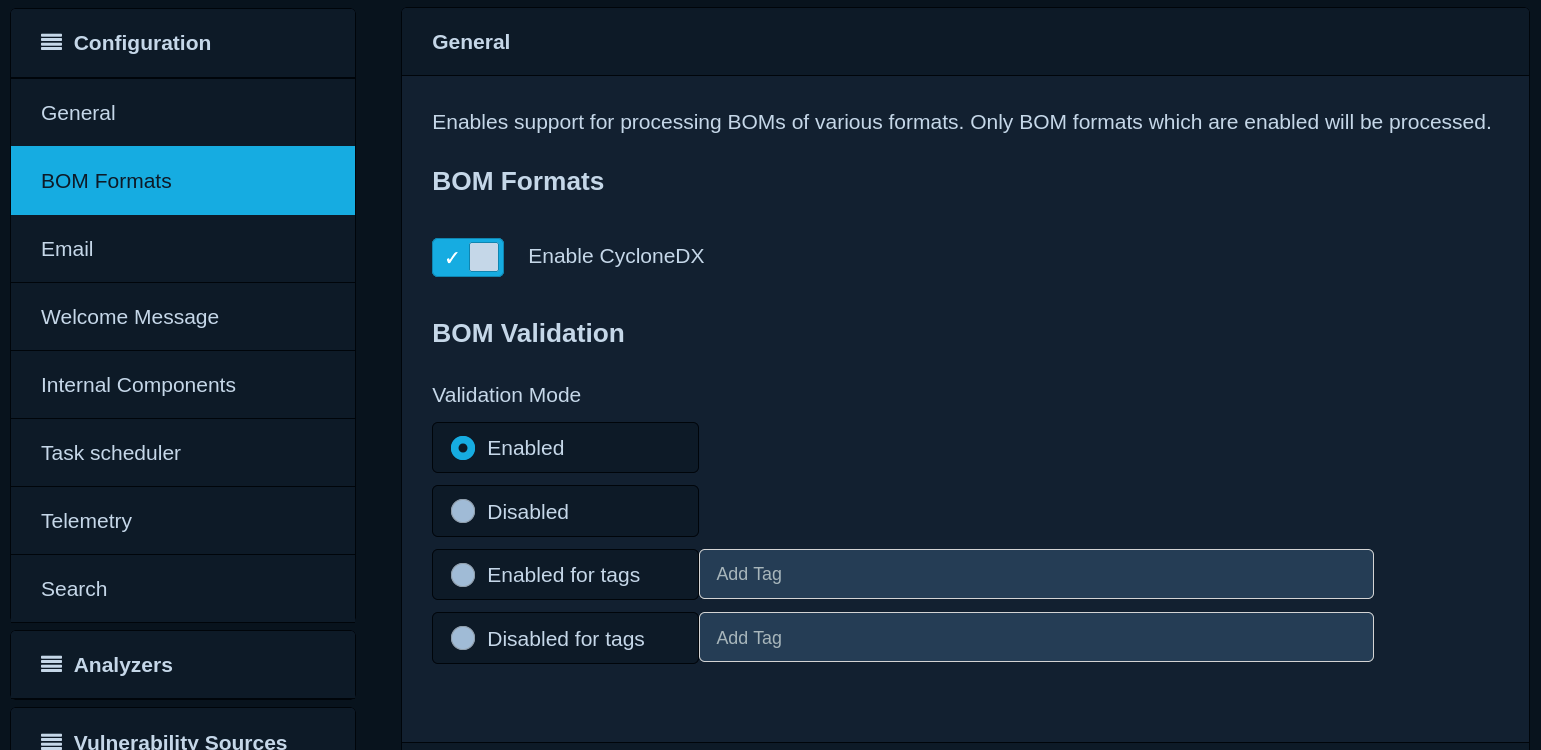
Dependency-Track once supported SPDX2 import. However, the team removed it for various reasons (https://github.com/DependencyTrack/dependency-track/discussions/1222). The team is now discussing SPDX3 support (https://github.com/DependencyTrack/dependency-track/issues/1746). For now, it only imports CycloneDX SBOM and CycloneDX VEX files.
It never supported the OpenVEX format (https://github.com/DependencyTrack/dependency-track/issues/4862#issuecomment-2820847602).
This limitation matters for teams using build systems that emit SPDX by default. Yocto is one example: it can export SPDX2 and SPDX3 files, depending on the version. In addition, Yocto stores vulnerability data in custom cve-check or sbom-cve-check JSON outputs. VulnScout can directly consume SPDX 2.3 JSON and tag-value data, SPDX 3.0, Yocto SPDX archives, Yocto cve-check or sbom-cve-check JSON, CycloneDX, OpenVEX, and native Grype JSON. Dependency-Track, by contrast, still expects CycloneDX for SBOM uploads.
There are workarounds; however, each one has trade-offs:
- Some converters turn SPDX into CycloneDX. However, they often drop useful metadata.
- iris-GmbH maintains meta-cyclonedx to export CycloneDX from Yocto. Still, that output has less data than native Yocto SPDX files. For example, it does not export the compiled-file list that helps filter many Linux kernel CVEs (work is ongoing in a git issue: https://github.com/iris-GmbH/meta-cyclonedx/issues/53).
Dependency-track
By comparison, VulnScout works with a much broader set of formats. It can both import and export SPDX2 (single JSON files and Yocto Scarthgap archives), SPDX3, CycloneDX, and OpenVEX. Also, it can additionally import Grype, Yocto cve-check, and Yocto VEX. Therefore, teams can connect VulnScout to build artifacts with little extra work, including artifacts produced by Yocto. More importantly, VulnScout does not force a Yocto project to adapt its build outputs to the assessment tool. It understands the evidence Yocto already produces.
Build system integration (Yocto example)
The meta-vulnscout layer is a substantial differentiator for Yocto workflows. It turns vulnerability assessment into a native BitBake task rather than a separate platform-integration project. In practice, it provides dedicated tasks for interactive assessment, non-interactive CI analysis, report generation, and enriched SBOM or VEX export. It also derives variants automatically from the Yocto distribution, machine, and image. For embedded Linux teams, that is a stronger proposition than generic format compatibility alone.
Reports
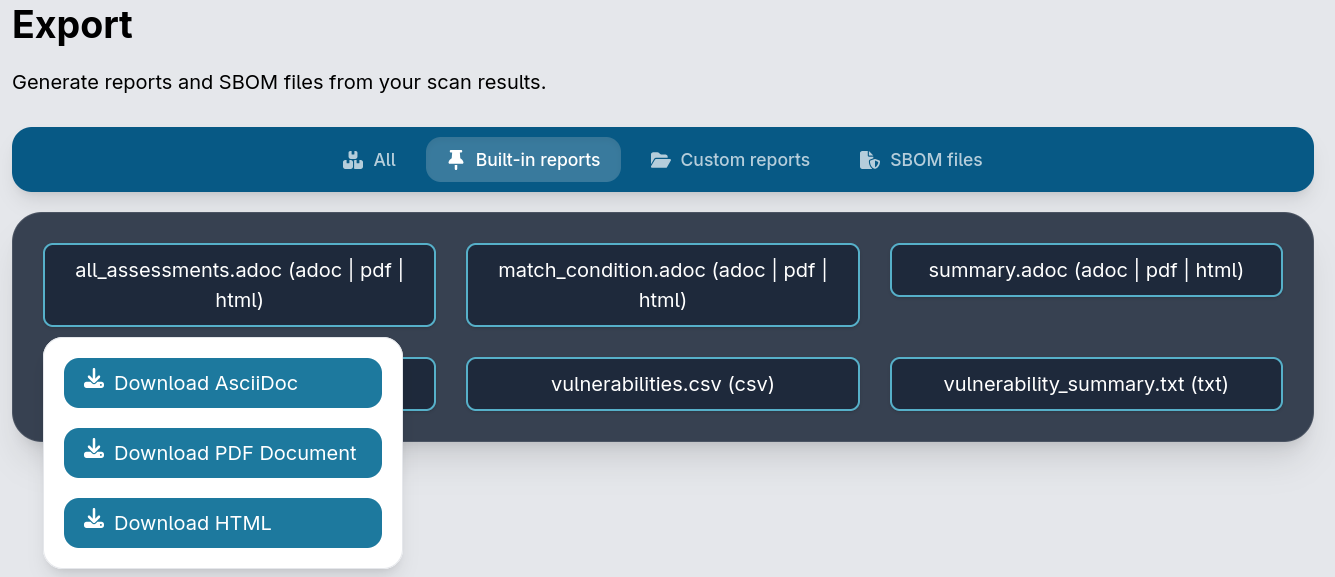
VulnScout supports default and user-defined report templates, with support for Jinja templating marks. This allows generating comprehensive text-based report artifacts related to the project, the packages it uses, and related vulnerabilities. VulnScout also supports rendering AsciiDoc text formats to HTML and PDF for convenience. This makes the reporting feature closer to a deliverable-generation system than a simple export function. By contrast, Dependency-Track does not appear to offer the same built-in document template model.
 VulnScout
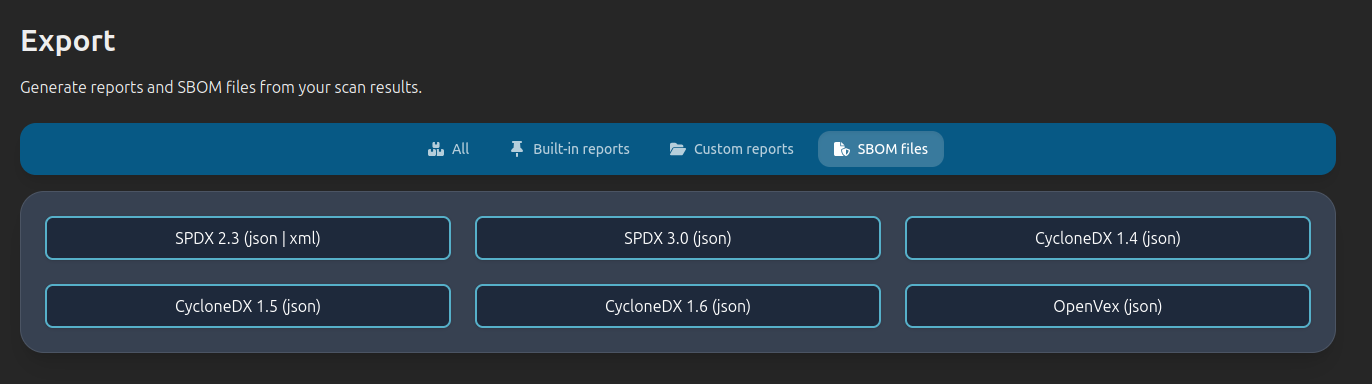
VulnScout can also export enriched data in SPDX2, CycloneDX, OpenVEX, and other supported formats, including your assessments and extra metadata.
This also highlights an architectural difference. VulnScout treats the assessment itself as a portable artifact, not only as state stored in an application database. Teams can export OpenVEX-based assessment results, keep them alongside build artifacts, re-import them later, share them across instances, or reuse them after resetting a CI database. That fits reproducible builds, evidence packages, and customer handoffs especially well.
VulnScout
SBOM enrichment and continuous analysis
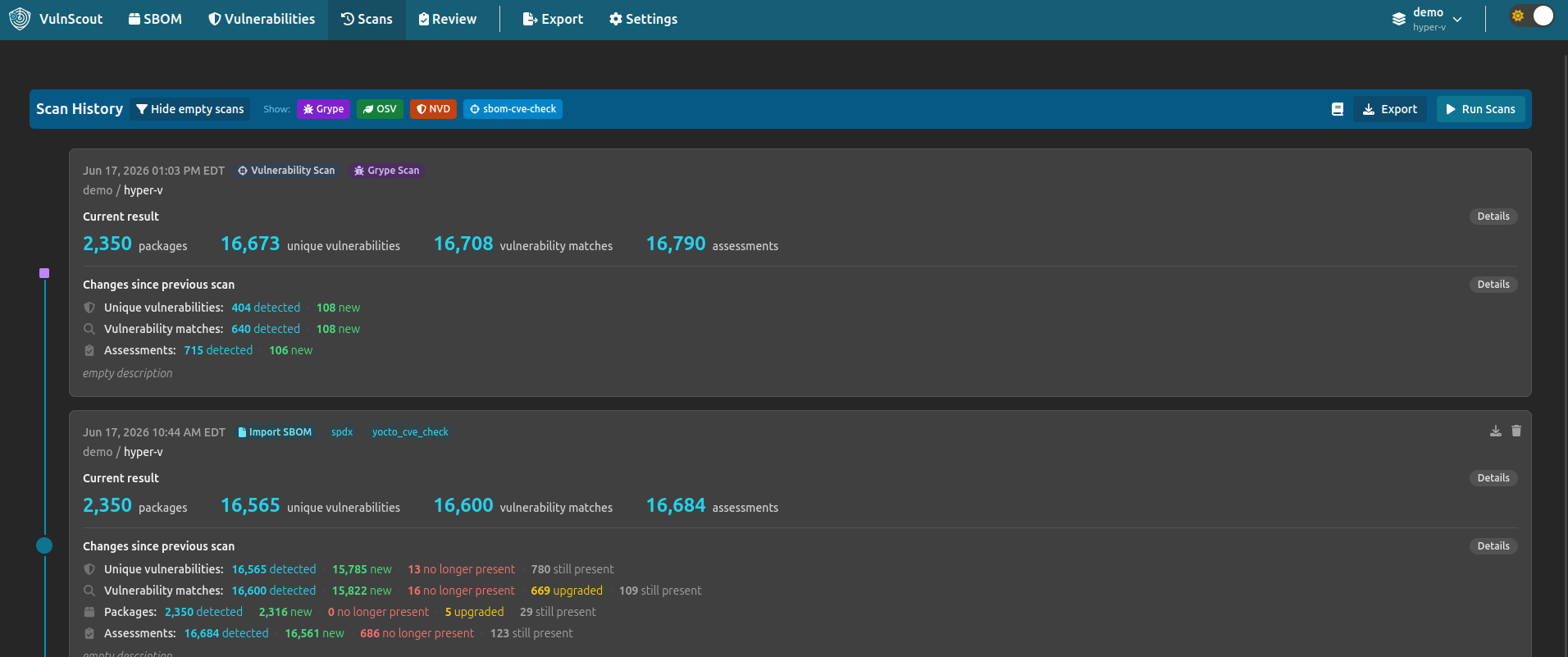
VulnScout can find issues beyond the first SBOM import, using open-source scanners to detect newly disclosed vulnerabilities. You can run Grype, OSV, and sbom-cve-check on a full project or on a single variant, which lets teams keep reviewing older SBOMs when generating a new one is difficult. Each scan is logged in the Scan tab, giving a single view that summarizes findings across imports and scans.
That explicit execution model matters. VulnScout can combine heterogeneous evidence in one assessment: package inventory from SPDX, Yocto’s own CVE analysis, existing OpenVEX decisions, Grype findings, later enrichment, and subsequent scanner runs. It preserves those evidence sources instead of forcing every input through a single ingestion format. This makes the workflow easier to reproduce for a specific release build.
Dependency-Track uses a different model. Instead of manual scanner triggers, it ingests CycloneDX BOMs and continuously checks components against many intelligence sources (NVD, GitHub Advisories, OSV, OSS Index, Snyk, Trivy, and others). In addition, it runs automatic periodic re-analysis.
VulnScout
Variants and Versions
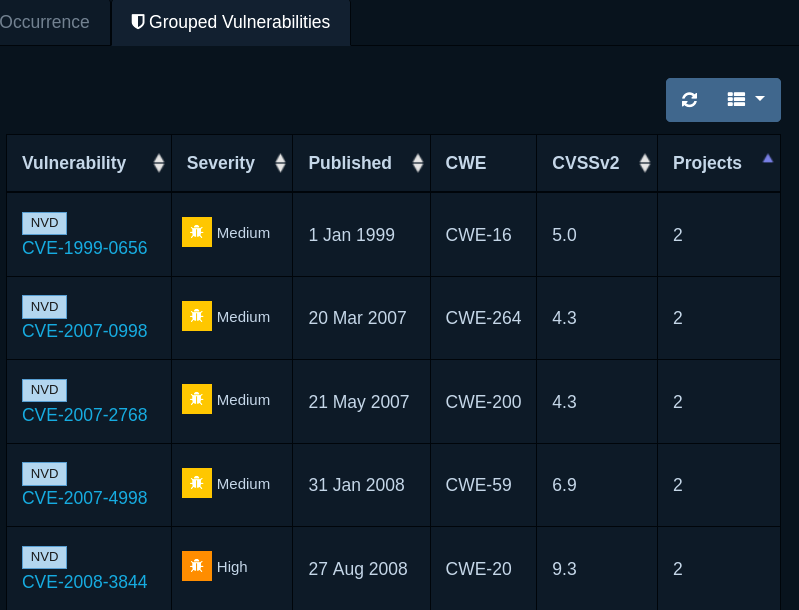
Both tools support multiple SBOM snapshots for one project. VulnScout calls them “Variants,” while Dependency-Track calls them “Versions.”
The underlying data models differ. In VulnScout, several builds can belong to one assessment domain, so shared findings can be reviewed together. In Dependency-Track, versions are separate projects, which means the same CVE may appear separately in multiple child projects without that being a counting error. Dependency-Track 5 adds collection projects to aggregate metrics across selected child projects, but those children remain distinct projects with separate findings.
Dependency-track
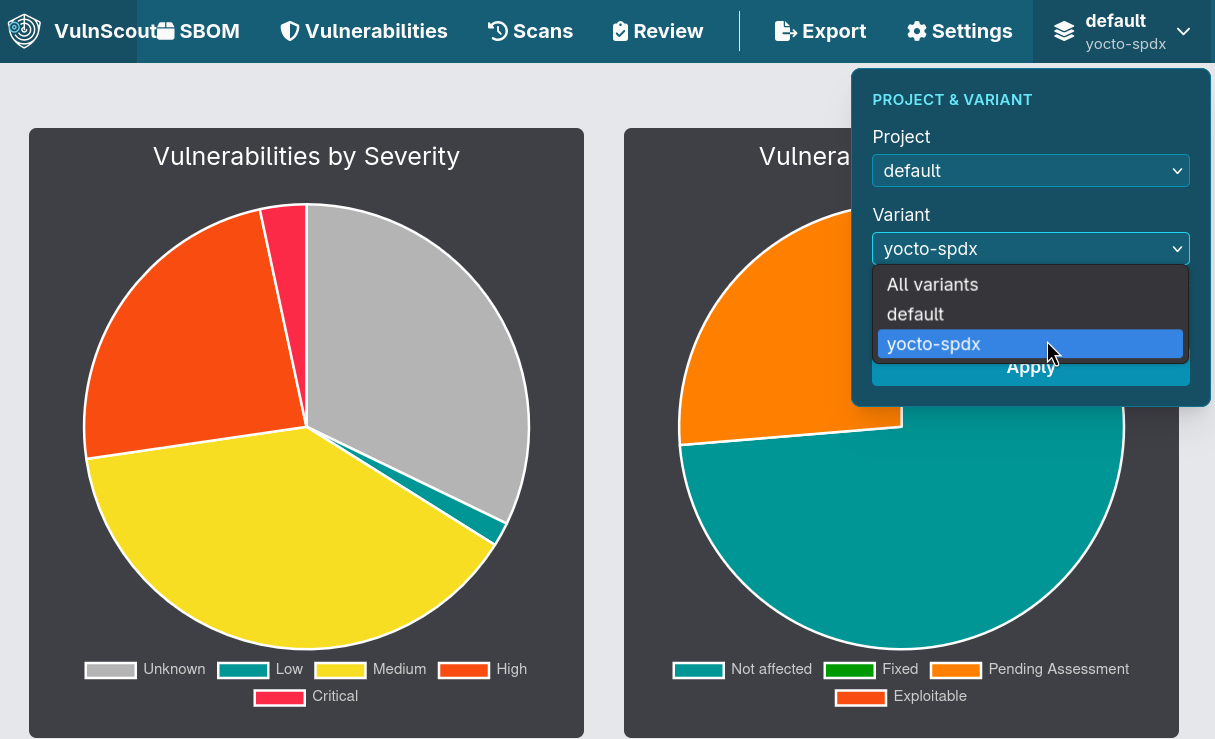
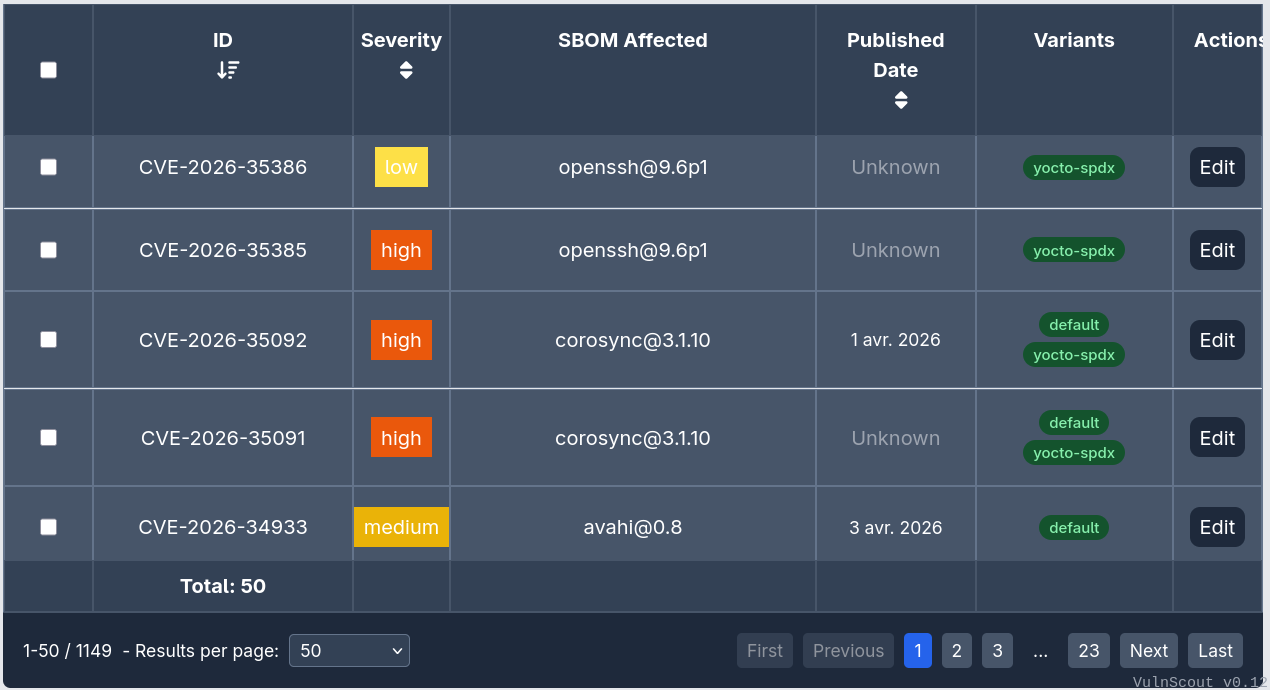
VulnScout maps more directly to embedded product families. If the same CVE appears in two variants of one project, dashboard graphs count it once at the project level, and users can isolate a single variant with the variant picker. The vulnerabilities table also shows exactly which variants are affected. For embedded Linux products, that is often a better match than treating each name/version pair as a separate project.
VulnScout
Assessments
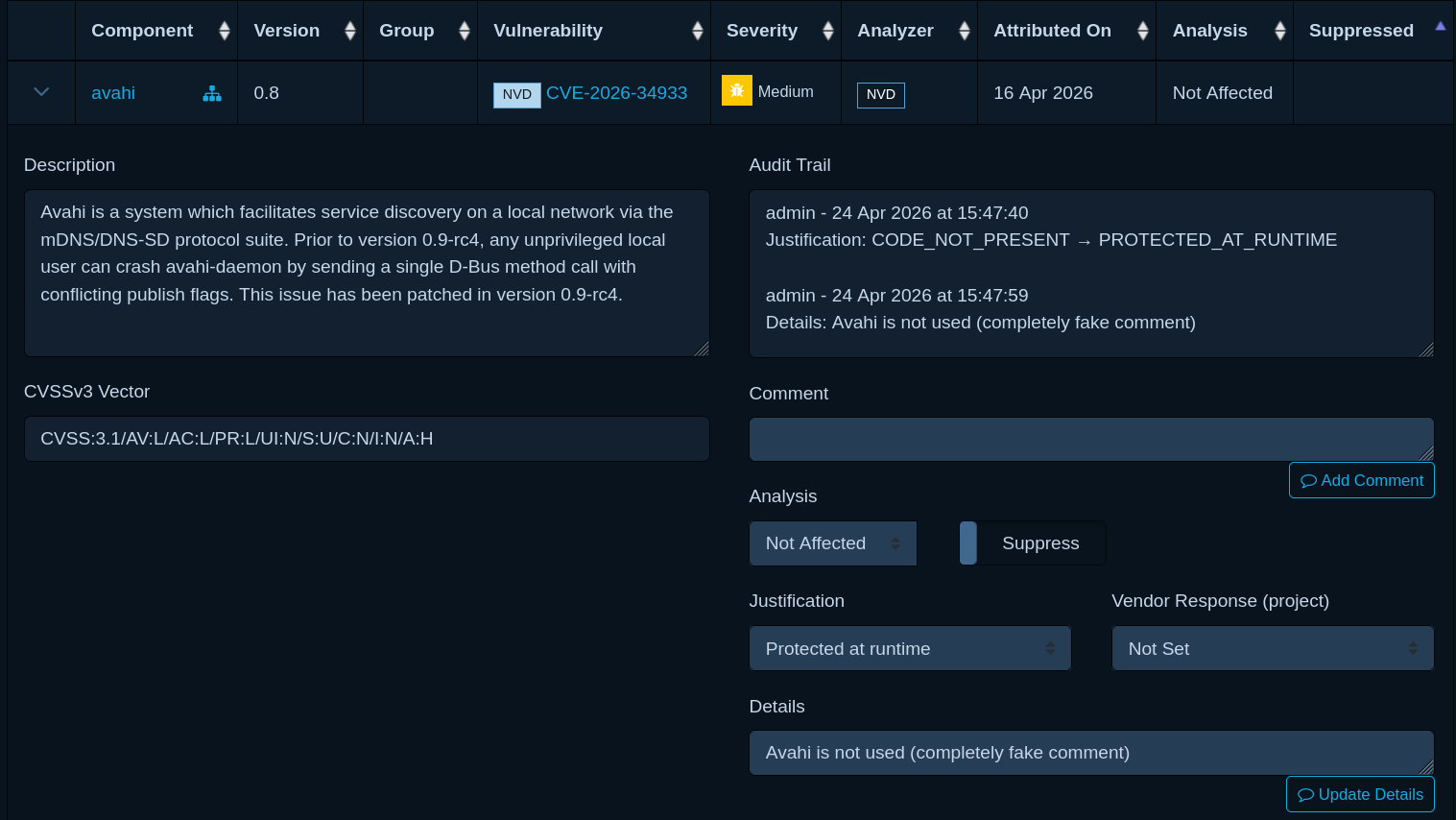
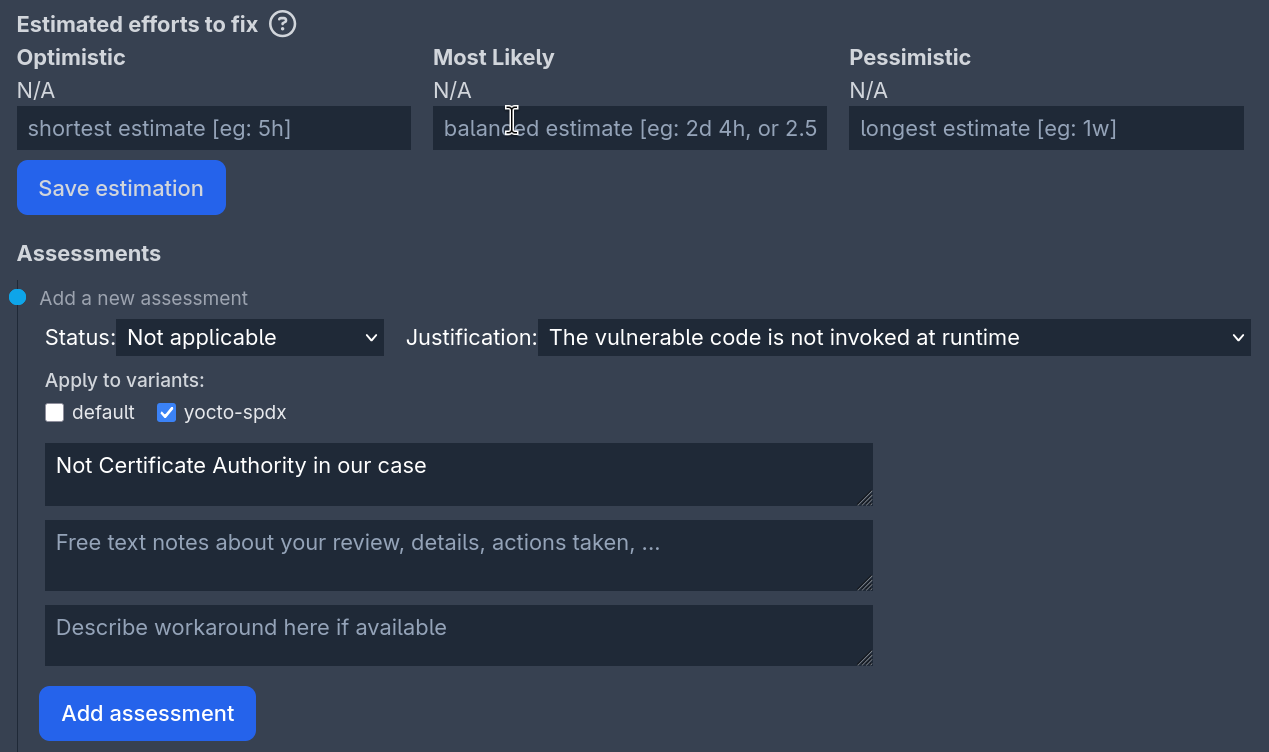
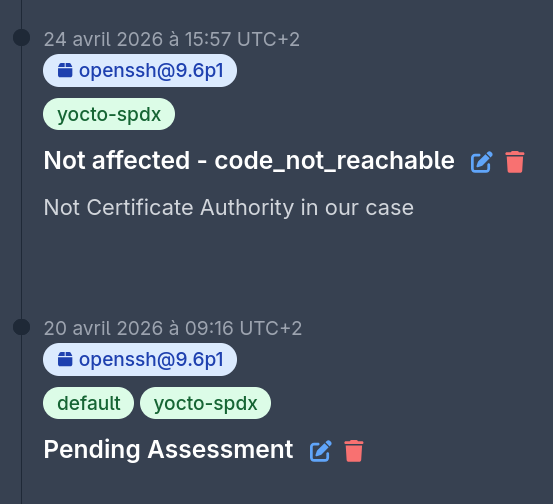
The core assessment flow is similar in both tools: you open a vulnerability, review its details, choose a status, add your reason, and optionally add a comment.
VulnScout gives a smoother trail for deeper investigations, whereas Dependency-Track shows a text-only audit stream where many small changes appear ungrouped.
Dependency-track
VulnScout
VulnScout
VulnScout also includes time estimates in the assessment UI. Teams can export tracked time in CSV through the reporting feature.
This is more than a convenience feature. It connects vulnerability triage to remediation planning by turning review work into data that can feed engineering estimates, project planning, or customer quotations. That makes VulnScout useful not only for deciding whether a CVE matters, but also for estimating the cost of addressing it.
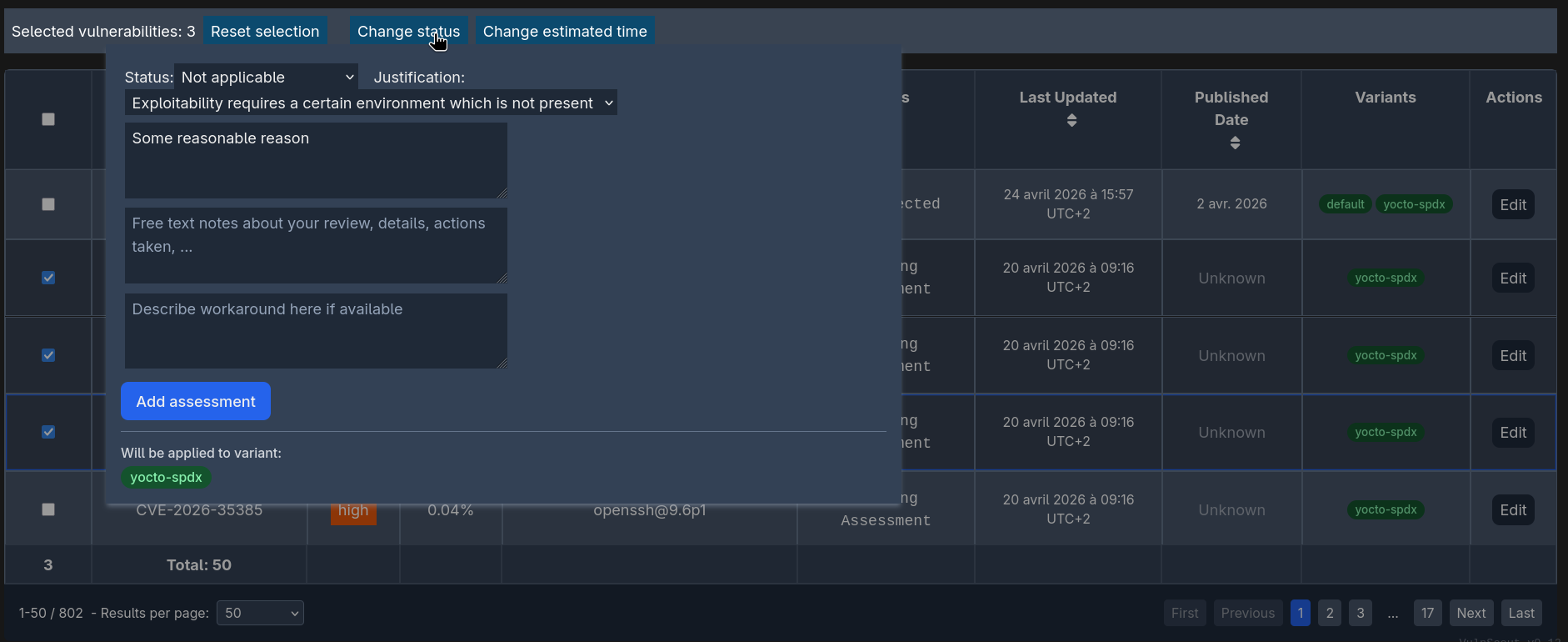
Assessment scope is another difference. In VulnScout, checkboxes let you apply one assessment to selected variants, while Dependency-Track users usually repeat the same assessment across versions. VulnScout also supports bulk assessment, whereas Dependency-Track often needs one-by-one edits for repeated actions.
VulnScout
Policies
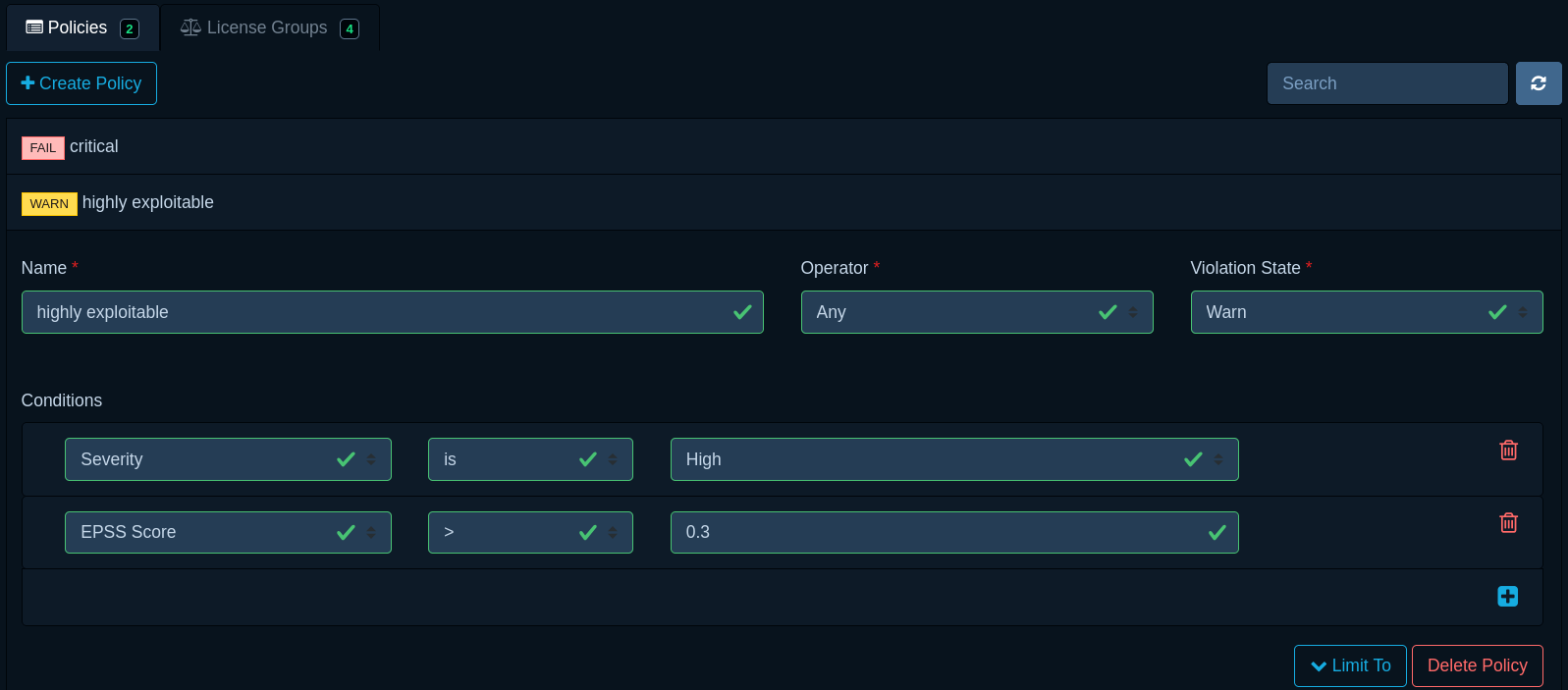
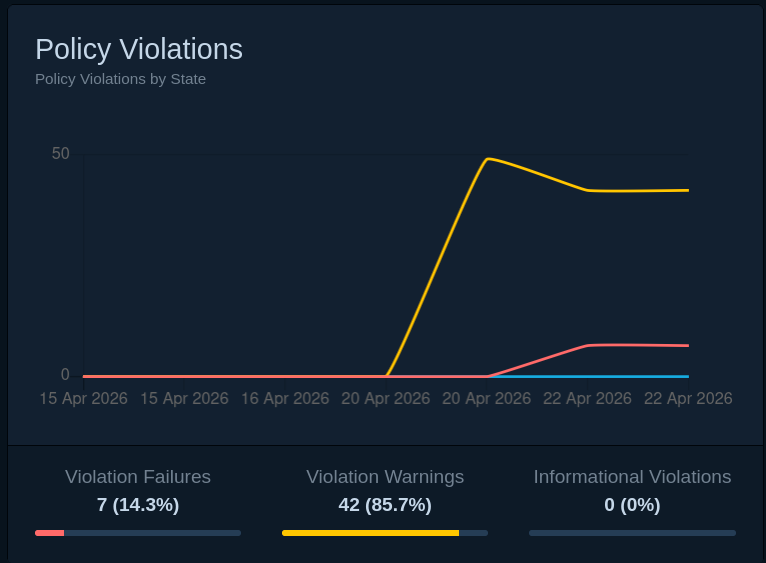
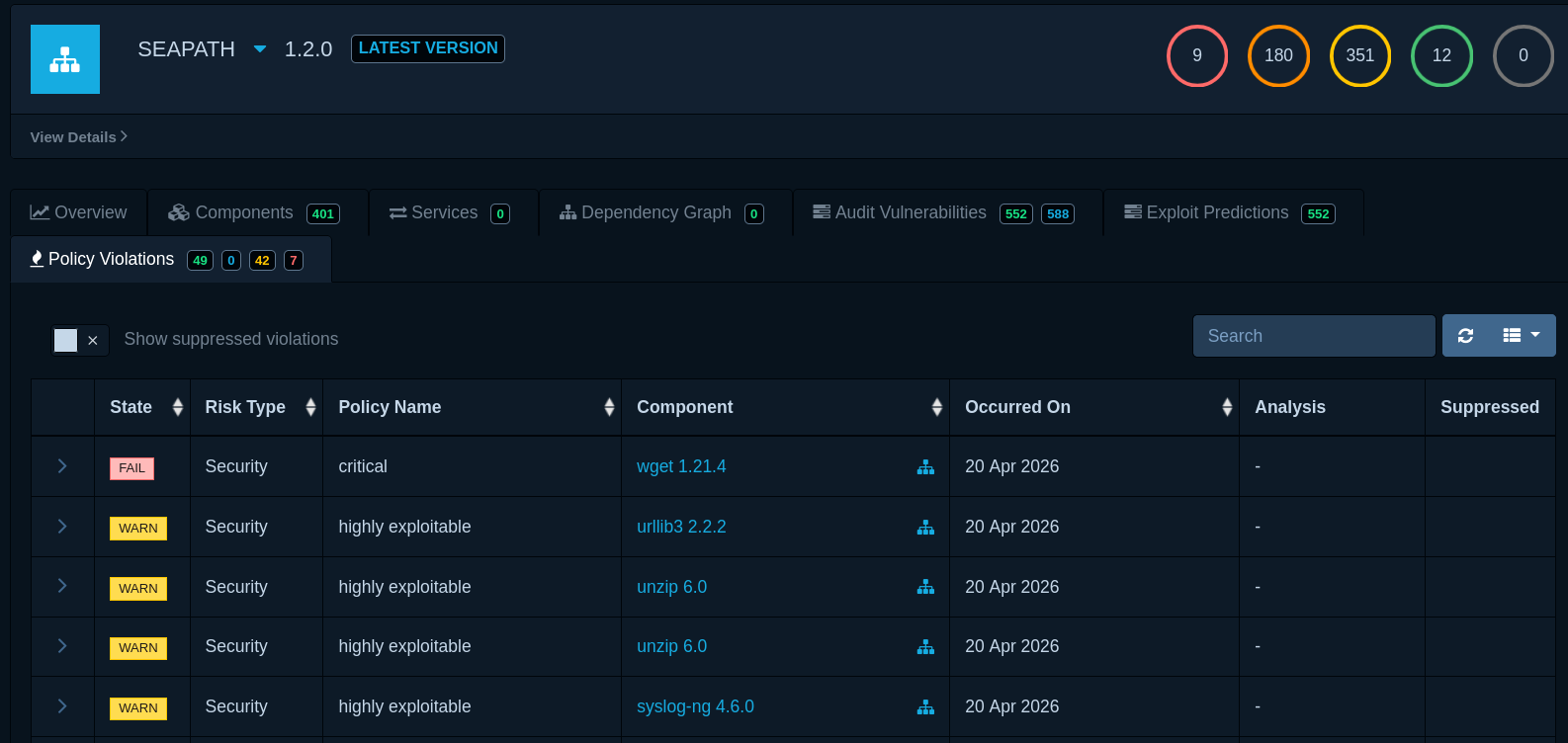
Both tools let users define rules for high-risk vulnerabilities.
In VulnScout, this feature targets CI use. You run VulnScout with --match-condition and, if needed, request a report for matched CVEs. If a vulnerability matches, VulnScout exits with a non-zero code. Therefore, CI integration is straightforward. Rule expressions can be complex. At the moment, though, match conditions remain a backend and CLI feature, not a dashboard feature.
$ ./vulnscout \
  --match-condition "((cvss >= 9.0 or (cvss >= 7.0 and epss >= 30%)) and (pending == true or affected == true))" \
  --report "match_condition.adoc"
# Vulnerability triggered fail condition: CVE-2016-0749
# Vulnerability triggered fail condition: CVE-2016-10642
# ...
# Report written: /scan/outputs/match_condition.adoc
By contrast, Dependency-Track uses Common Expression Language (CEL), which supports complex Boolean expressions, regular expressions, version ranges, dependency-graph traversal, project tags, and custom functions. It also introduces vulnerability policies that can automatically triage, suppress, and rerate findings across current and future projects. Dependency-Track therefore has strong built-in governance features. VulnScout’s stronger point is different: it can evaluate match conditions inline in a local or CI-driven assessment workflow and immediately return a CI-friendly exit code.

Dependency-track
Exploit Prediction
To prioritize exploit risk, teams usually combine two scores:
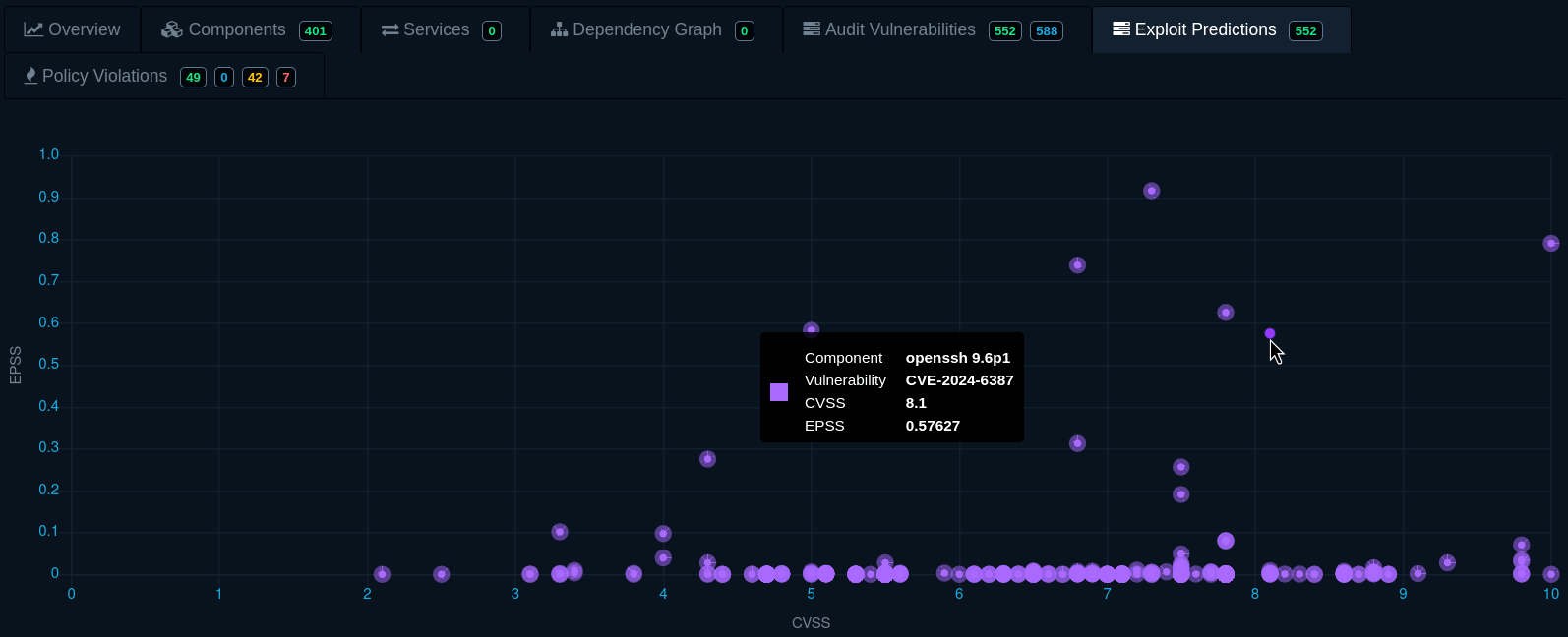
Combining both scores makes prioritization easier. Dependency-Track offers a clear two-dimensional chart with CVSS on one axis and EPSS on the other, so high-priority issues appear in the top-right area. VulnScout does not yet provide this chart, though users can still sort the vulnerability list by CVSS or EPSS.
Dependency-track
Dependency-Track 5 goes further by adding Known Exploited Vulnerability (KEV) monitoring. It can pull KEV data from multiple sources (starting with CISA KEV, ENISA KEV, and VulnCheck KEV), flag affected findings in the audit view, filter the list down to KEVs only, raise policy violations on KEVs, and trigger alerts when new KEVs appear. This is a meaningful addition for Cyber Resilience Act compliance, which expects products to monitor components for known-exploited vulnerabilities. VulnScout does not currently track KEV status.
Integration with CIs
VulnScout integrates easily into CI thanks to its full CLI (https://vulnscout.readthedocs.io/en/latest/vulnscout-script.html#non-interactive-mode-ci-automation). Because it starts quickly as a container, a pipeline can run the whole assessment locally with minimal setup. In practice, VulnScout can be the CI job: it can import evidence, enrich findings, evaluate a match condition, produce reports, and export enriched artifacts in one workflow.
Below is a simple workflow that loads SPDX and cve-check files, generates reports, and fails if some CVEs match the fail condition:
./vulnscout --project demo --variant x86 \
  --add-spdx $(pwd)/example/spdx3/core-image-minimal-qemux86-64.rootfs.spdx.json \
  --add-cve-check $(pwd)/example/spdx3/core-image-minimal-qemux86-64.rootfs.json

./vulnscout \
  --match-condition "((cvss >= 9.0 or (cvss >= 7.0 and epss >= 30%)) and (pending == true or affected == true))" \
  --report "summary.adoc" \
  --report "vulnerabilities.csv" \
  --report "match_condition.adoc"

# The previous command will fail if a CVE matches the condition, thus failing the workflow.
Dependency-Track works differently. It is usually a long-running service that the CI job calls. In that model, pipelines publish a CycloneDX BOM to a deployed instance and then rely on the platform for analysis, policy evaluation, and broader portfolio governance. That is a valid CI/CD model, but it is different from running the whole assessment inside one self-contained job. Common integration options include:
- The official Jenkins plugin does a great job (uploads BOMs, displays vulnerabilities, and reports policy violations).
- Another option is the official GitHub Action, which Dependency-Track documentation recommends for GitHub workflows. Its scope is narrower, however, because it primarily uploads a BOM.
- You can also use third-party GitHub Actions that do more, but third-party maintenance adds security risk.
- Finally, you can make raw HTTP requests and process the response data, but that is more complex to implement.
Recap table
Deployment and formats
| Topic | VulnScout | Dependency-Track |
|---|
| Deployment model | Build-native, on-demand assessment workbench | Centralized, continuously operating inventory and governance platform |
| First start-up effort | Low (run and use quickly) | Higher (Docker Compose + DB mirroring + setup) |
| Build-system compatibility | Strong for native SPDX/OpenVEX workflows (including Yocto cve-check) | Stronger for CycloneDX-first workflows; may require conversion layers |
| SBOM/VEX formats | Broad input support | CycloneDX SBOM + CycloneDX VEX |
| SBOM export formats | Multiple options (including SPDX2, CycloneDX, OpenVEX) | CycloneDX SBOM + CycloneDX VEX |
Reports, analysis, and variants
| Topic | VulnScout | Dependency-Track |
|---|
| Custom report templates | Yes (Jinja templates aimed at assessment deliverables) | No equivalent built-in customer-document template engine |
| On-demand scanner runs | Yes (Grype/OSV/sbom-cve-check) | No equivalent per-project scanner trigger; relies on continuous analysis |
| CI/CD integration | Can run the full assessment locally inside one CI job | Strong service-driven CI model via BOM publication and platform analysis |
| Multi-user collaboration | Not the primary goal | Core design goal |
| Variants/versions handling | Variants belong to one assessment domain and map well to product families | Versions remain separate projects, but the collection feature added in v5 aggregates metrics |
Assessment, policies, and fit
| Topic | VulnScout | Dependency-Track |
|---|
| Bulk assessment | Yes | More manual workflow |
| Policy/condition expressiveness | High (complex match expressions) | High in v5 (CEL expressions, graph-aware conditions, vulnerability policies) |
| Policy visibility in UI | Limited (mainly backend/CLI today) | Strong dashboard integration |
| Exploit prediction chart (CVSS x EPSS) | Not currently available | Available in dedicated visualization |
| Known Exploited Vulnerability (KEV) monitoring | Not currently tracked (WIP) | Yes in v5 (CISA/ENISA/VulnCheck KEV, filtering, policy violations, alerts) |
| Best fit | Embedded Linux, Yocto, reproducible pipelines, and artifact-centric assessment | Enterprise portfolio inventory, continuous monitoring, and centralized governance |
Conclusion
Choose Dependency-Track when you need a continuously operating, multi-user platform for inventorying and governing a large software portfolio. Choose VulnScout when vulnerability assessment must live close to the build, consume native Yocto evidence, preserve assessments as portable artifacts, and produce reproducible reports and CI results without requiring a central service.
References