AI coding agents can now modify repositories, run tests, and propose commits. Yet writing code is only one part of engineering work. Between a ticket and a merged change, several steps are still required: gathering context, preparing the environment, producing a patch, opening a review, waiting for feedback, and updating the code until it is accepted.
This is precisely where Virtual Engineer comes in.
This open-source, self-hosted orchestrator brings AI agents into the entire engineering cycle. To do so, it connects the systems a team already uses — ticketing systems, Git repositories, and code review tools — to the coding agents of its choice. Each cycle runs inside an ephemeral sandbox.
The goal is not to replace the development workflow, but rather to allow AI agents to participate in it.
From Coding Assistant to Virtual Engineer
Tools such as Copilot, Claude Code, Aider, and other AI agents can already work on a repository at a developer’s request.
Virtual Engineer starts with a different question: What happens if, instead of simply giving an agent an instruction, you give it a ticket?
In that scenario, the agent must be able to:
- Detect when a ticket is assigned to it.
- Retrieve the repository and its context.
- Work in an isolated environment.
- Produce a change.
- Submit it to the existing review system.
- Understand reviewer feedback.
- Produce a new iteration.
- Stop when the change is accepted or when an operator intervenes.
This is the orchestrator’s role.
Virtual Engineer supports two complementary workflows: ticket-driven coding and automated review of incoming changes.
1. An Architecture Designed to Orchestrate Work, Not Replace Existing Tools
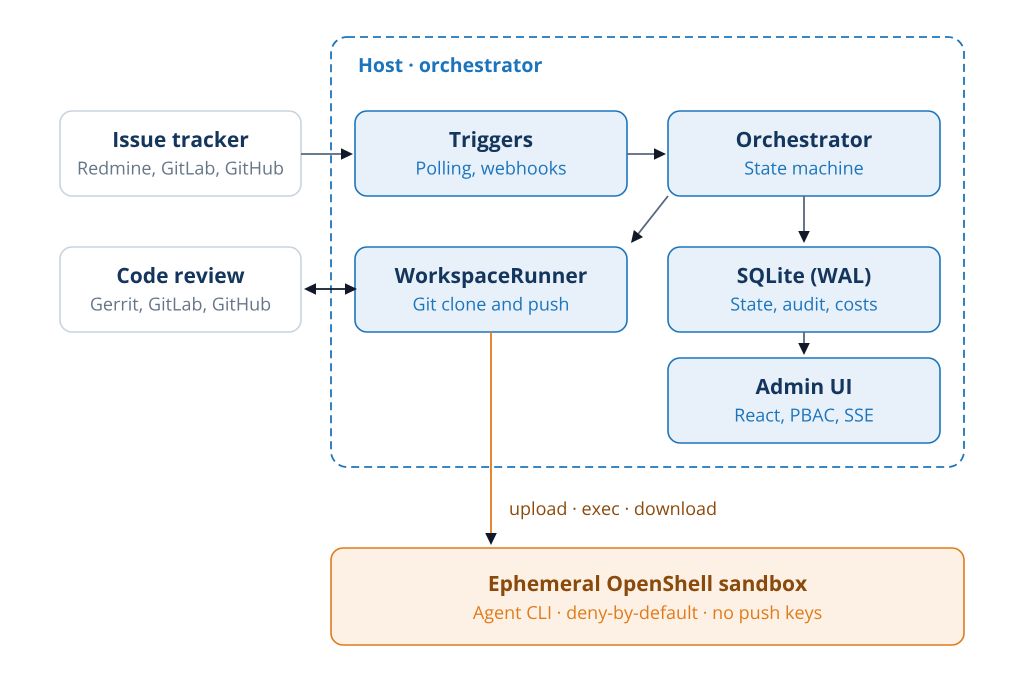
Figure 1 — Virtual Engineer architecture.
At the heart of Virtual Engineer is a TypeScript-based orchestrator host.
It receives events from ticket-tracking and code review systems. It then drives the workflow, maintains its state, and hands code execution to a WorkspaceRunner.
The architecture has four main components:
- Triggers: polling and webhooks to detect incoming work.
- Orchestrator: a state machine that manages a task’s lifecycle.
- SQLite (WAL): persistence of workflow state, audit data, and costs.
- Admin UI: a React interface for monitoring and managing executions.
The WorkspaceRunner serves as the operational boundary between the host and the ephemeral OpenShell sandbox.
This separation is important: the orchestrator keeps control of the workflow and Git operations. Meanwhile, the agent gets an isolated space where it can do real work.
As a result, the system adds neither a new dev platform nor a new ticketing system. Instead, it orchestrates existing tools around an agent.
Two Workflows, One Orchestrator
The first workflow starts with a ticket.
In this scenario, Virtual Engineer monitors Redmine, GitLab Issues, or GitHub Issues. When a ticket is assigned, it prepares the context, launches an agent in a sandbox, and gets the result. It then submits that result to Gerrit, GitLab, or GitHub.
The second workflow, by contrast, works in the opposite direction: when a change enters review, Virtual Engineer can ask an agent to analyze the diff, post comments, and cast a vote.
These two use cases therefore address different stages of the development cycle:
- Producing an initial change from a ticket.
- Providing initial feedback when a change enters review.
However, humans still make the final decision. Virtual Engineer automates the work and the handling of feedback, but human review stays required.
2. Anatomy of a Cycle: From Git on the Host to the Agent’s Workspace
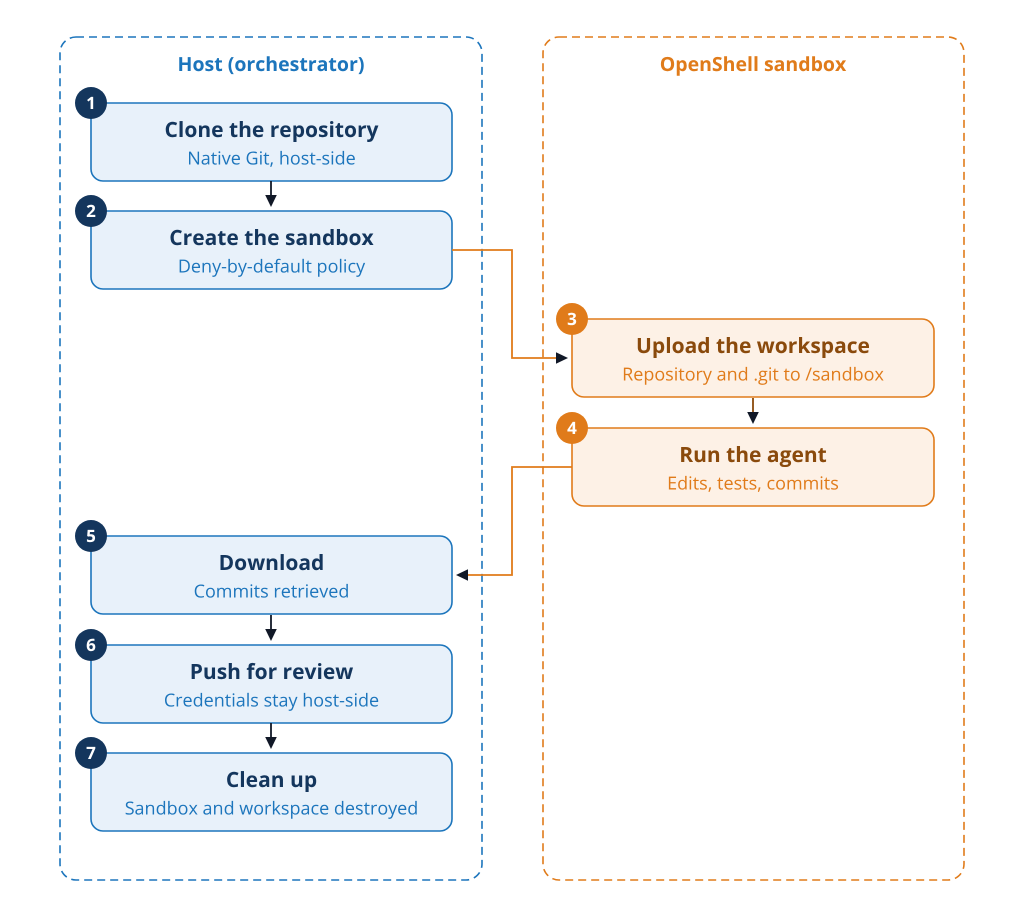
Figure 2 — A seven-step agent cycle between the host and the OpenShell sandbox.
A complete cycle can be broken down into seven steps.
1. Clone the repository
First, the orchestrator retrieves the repository on the host, using the credentials required for Git operations.
2. Create the sandbox
The host then creates an ephemeral OpenShell sandbox with a deny-by-default policy.
3. Upload the workspace
Next, the host copies the repository and its .git directory to /sandbox.
4. Run the agent
The agent then reads the code, edits files, runs tests, and creates commits inside this isolated environment.
5. Download
Once the work is complete, the host downloads the workspace and the new commits.
6. Push for review
The host then pushes the changes to the review system.
7. Clean up
Finally, the host destroys the sandbox and the ephemeral workspace.
The key point is that the agent does not need the Git credentials used to push changes. Sensitive operations remain on the host.
The sandbox is therefore more than a container that runs a command. It creates an execution boundary between the orchestrator and the agent.
3. A State Machine That Turns Execution into a Workflow
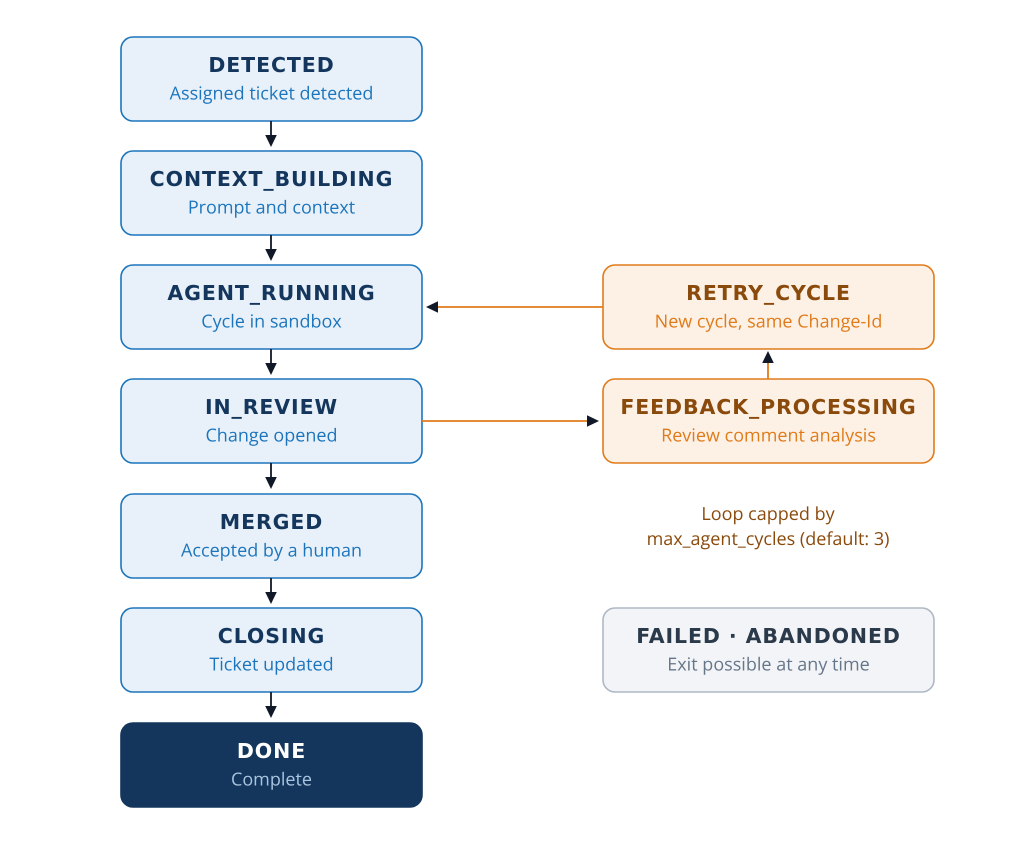
Figure 3 — The code workflow state machine and its feedback loop.
A simple command that launches an agent and waits for the result is not enough to manage autonomous work.
Instead, Virtual Engineer represents each task with an explicit state machine.
The standard workflow is:
DETECTED → CONTEXT_BUILDING → AGENT_RUNNING → IN_REVIEW → MERGED → CLOSING → DONE
However, the review process can also send work back to the agent.
When a reviewer provides feedback, the workflow moves through:
FEEDBACK_PROCESSING → RETRY_CYCLE → AGENT_RUNNING
The agent then resumes work with the context from the new cycle.
This loop is deliberately bounded by max_agent_cycles, which defaults to 3 cycles, as shown in the diagram.
With Gerrit, successive cycles can retain the same Change-Id. Corrections then appear as new patchsets of the same change rather than as a series of independent contributions.
In addition, an operator can stop, resume, or abandon a task.
The state machine is therefore more than an implementation detail. In fact, it makes the contract between the agent, the orchestrator, and the review process explicit.
4. The Trust Boundary: The Agent Only Gets What It Needs
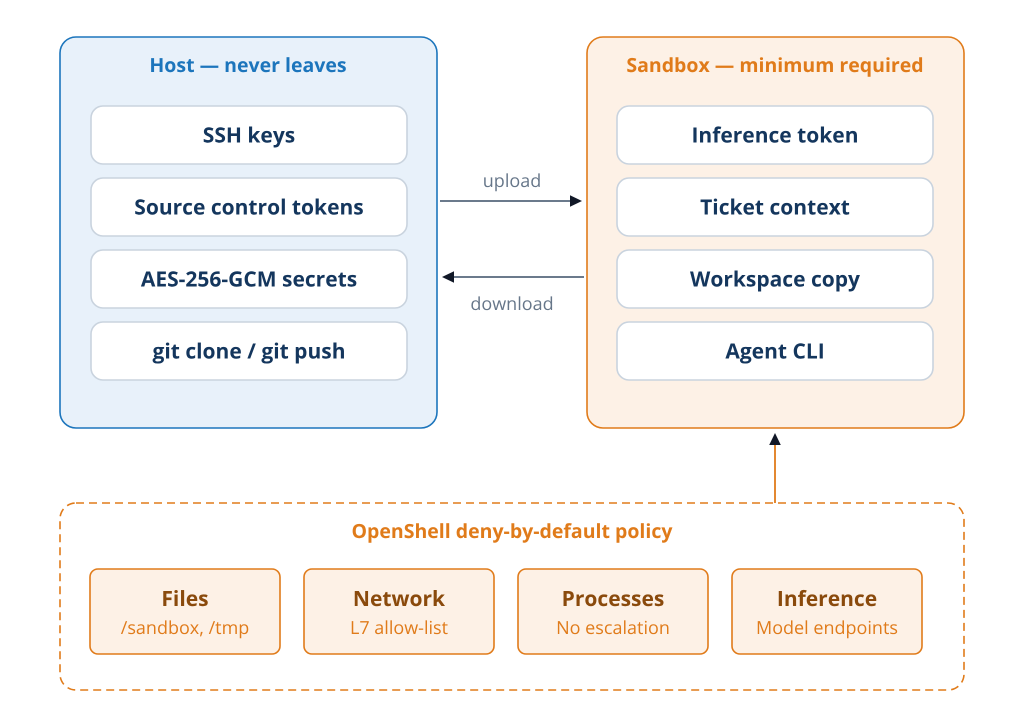
Figure 4 — The trust boundary between the host and the sandbox.
Virtual Engineer’s security principle is simple: the credentials required to manage the repository remain on the host, while the agent works in an isolated environment.
On the host side, this includes:
- SSH keys.
- Source control tokens.
- Encrypted secrets.
git clone and git push operations.
By contrast, the sandbox only receives what the agent needs to do its work:
- The inference token.
- Ticket context.
- A copy of the workspace.
- The agent CLI.
An OpenShell deny-by-default policy also reinforces this separation.
The diagram breaks this policy down into four areas:
- Files:
/sandbox and /tmp. - Network: L7 allow-list.
- Processes: no privilege escalation.
- Inference: authorized model endpoints.
This is not to claim that an agent can never produce an undesirable result. Instead, the approach is to limit what it can do and keep sensitive operations out of its reach.
Finally, the sandbox is ephemeral: once the cycle is complete, its working environment is destroyed.
5. Pluggable Capabilities Instead of a Single Prescribed Agent
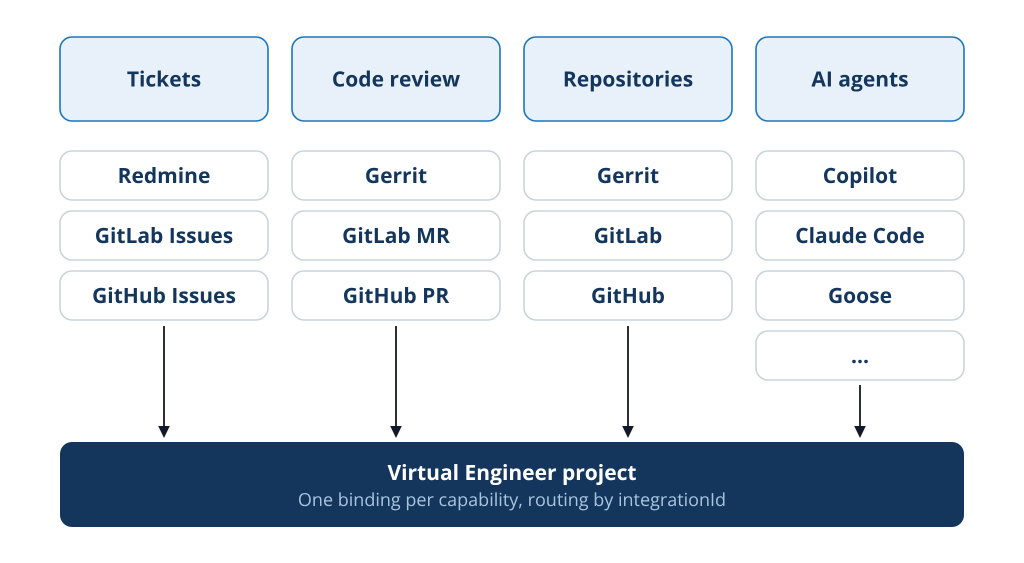
Figure 5 — Virtual Engineer’s capabilities are separated from the providers that implement them.
Virtual Engineer does not treat the agent as a single, fixed dependency.
The system instead distinguishes between four capabilities:
issue_tracking;code_review;source_control;agent_execution.
You can then connect each capability to an integration.
- Ticket tracking: Redmine, GitLab Issues, or GitHub Issues, for example.
- Code review and repositories: Gerrit, GitLab, and GitHub.
- AI agents: Copilot, Claude Code, Aider, Goose, Codex, Gemini CLI, OpenCode, or Cursor, depending on the integrations available in the project.
The value of this abstraction goes beyond offering a long list of connectors. Above all, it allows the same workflow to remain in place even when the provider changes. A project links its capabilities to integrations through integrationId. Several integrations of the same type can also coexist.
The orchestrator thus becomes an independent layer, separate from the agent engine.
AI-Powered Code Review That Remains Actionable
Virtual Engineer’s second workflow focuses on analyzing changes produced by others. The challenge here is different: an automated review that generates too many comments can quickly do more harm than good. The system therefore has several ways to control its output:
- Comment deduplication.
- Filtering out comments that do not correspond to diff lines.
- Severity thresholds.
- Limits on the number of comments.
In short, the goal is to provide an initial, actionable round of automated feedback before human review.
Observing What AI Agents Do
Autonomous AI agents add another requirement: you must be able to understand what they did. To address this, Virtual Engineer stores workflow state in SQLite using WAL mode. It also records state transitions and the data for each cycle. The admin interface then lets you monitor executions and costs.
The architecture diagram shows this link between the orchestrator, SQLite, and the Admin UI: persistence is not an add-on, but a core part of the workflow itself. This traceability matters most when several tasks run without a human at every step.
An Architectural Shift, Not Another Development Tool
Virtual Engineer is not designed to replace existing tools. Instead, it integrates AI agents into your system and uses an orchestrator to manage their lifecycle. This is what distinguishes the project from a simple coding assistant. An assistant usually waits for a developer to ask.
Virtual Engineer, on the other hand, treats the engineering cycle itself as the unit of execution: ticket → context → agent → change → review → feedback → new iteration → closure.
What If AI Agents Became Part of the Team?
This is ultimately the question Virtual Engineer aims to answer. Models can generate code. AI agents can also use tools, modify repositories, and run tests. The next step is to make them work within the real-world constraints of an engineering team:
- Tickets.
- Repositories.
- Review rules.
- Credentials.
- Security policies.
- Development tools.
- Control mechanisms.
Virtual Engineer therefore provides the infrastructure for this next step.
The agent is no longer just a tool that a developer calls. Instead, it becomes part of a workflow that the team can run, monitor, interrupt, and evolve.
That is the role of Virtual Engineer: bringing AI agents into the existing engineering process, rather than asking teams to rebuild their processes around them.
Try Virtual Engineer
Virtual Engineer is an open-source, self-hosted project. The repository and documentation are available here:
Once Virtual Engineer is installed, you can configure integrations, agents, and projects in the admin interface.
The first test can be very simple: connect a ticketing system, a repository, and an agent, then assign a ticket.
To go further, explore our other articles on artificial intelligence.